Times-7 Portal FAQs
Find answers to common questions about the Times-7 Portal, from choosing the right configuration and understanding read performance to reader compatibility, installation and deployment.

Find answers to common questions about the Times-7 Portal, from choosing the right configuration and understanding read performance to reader compatibility, installation and deployment.
The Times-7 Portal is available in three configurations, allowing you to select the solution that best matches your application.
| Configuration | Overview | Best suited for |
|
Times-7 Portal System
|
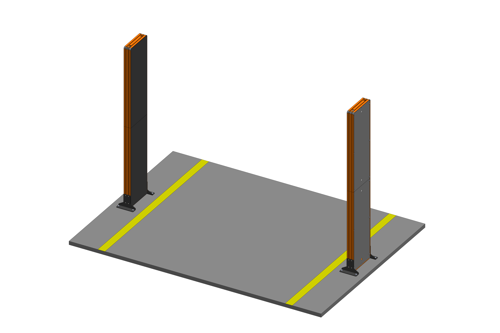
The Portal System uses four antenna units (two per side) to provide the broadest coverage and greatest flexibility. |
|
|
Times-7 Portal Tower
|
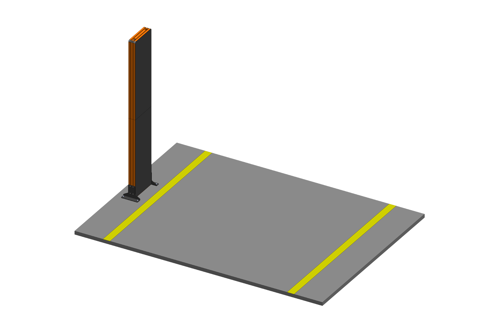
The Portal Tower places two antenna units (upper and lower) stacked on a single side, making it ideal where portal width is limited while maintaining excellent item-level performance. |
|
|
Times-7 Portal Base
|
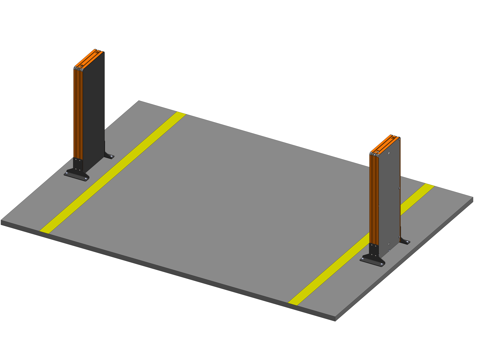
The Portal Base concentrates RF energy closer to the pallet, improving read performance for challenging products and at lower pallet heights. |
|
If you're unsure which configuration is best for your application, our team can help recommend the most suitable option.
The Times-7 Portal supports item, carton and pallet-level identification at warehouse and logistics checkpoints.
Read performance is influenced by the characteristics of the load. Product composition, packaging, pallet density, tag placement and orientation can all affect how RF energy reaches the tags. Dense loads and products containing liquids or metal can be more challenging because of the way these materials interact with RF energy.
Times-7 has conducted in-house testing using apparel, liquid-filled products and metal items, demonstrating strong read performance across these different product types and load conditions.
The Portal is available in three configurations to address different application requirements. Taller or mixed-product pallets, for example, may require greater coverage across the height and width of the load, while lower, dense pallets containing liquids or metal can benefit from RF coverage concentrated lower on the pallet.
As with any RFID deployment, testing with representative products, tags and pallet configurations is recommended to validate performance before full deployment.

Stray reads occur when tags outside the intended read zone are detected, for example from stock near the dock door or goods moving through an adjacent portal. Controlling where RF energy is directed is therefore an important part of portal design and system configuration.
The Times-7 Portal uses high-gain directional antennas with focused 50° horizontal beams to concentrate RF energy within the intended read zone. A high front-to-back ratio also limits RF radiation behind the antenna, helping reduce the potential for unwanted reads from adjacent portals, known as cross reads.
Together, these antenna characteristics provide greater control over the RF field and help minimise the keep-out zone required around the portal, which is particularly important when deploying multiple portals at adjacent dock doors or where space is limited.
Read performance can be further optimised by configuring reader power, antenna switching, portal placement and system settings to suit your deployment.
The Times-7 Portal is reader agnostic and is compatible with virtually any standard RAIN RFID reader.
Each Portal configuration includes a universal reader mount, that integrates the reader within the Portal structure. This gives organisations the flexibility to deploy the Portal alongside their existing hardware.
Yes. While the Portal has been designed for warehouse and logistics environments, it is also well-suited to retail back-of-house receiving.
It enables retailers to automatically verify inbound pallets, cartons and tagged merchandise as stock enters the storeroom, improving inventory accuracy from the point of receipt while reducing manual scanning.
Its more compact configurations (i.e. Times-7 Portal Tower and Times-7 Portal Base) make it suitable for space-constrained receiving areas.
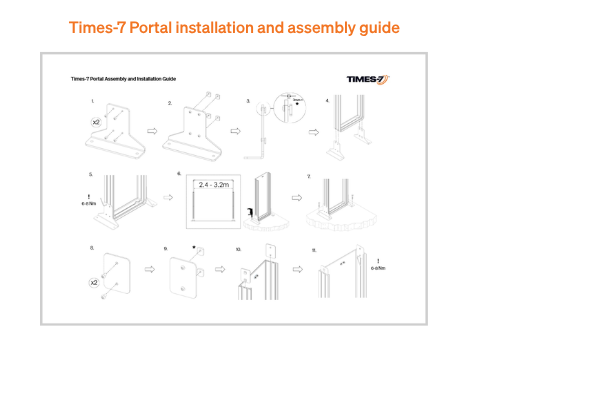
The Times-7 Portal has been designed for straightforward on-site assembly and installation. Its lightweight pultruded fibreglass construction makes the individual components easier to transport and handle, while the supplied mounting hardware provides secure floor installation.
The Portal's construction also allows for field adjustments and access for servicing without requiring the complete structure to be removed.
Where cabling needs to run between both sides of the Portal, the optional Cable Bridge provides a dedicated overhead cable route, supporting dock door widths from 2.4 to 3.2 metres and keeping cabling contained within the Portal installation.
For detailed assembly and installation instructions, refer to:
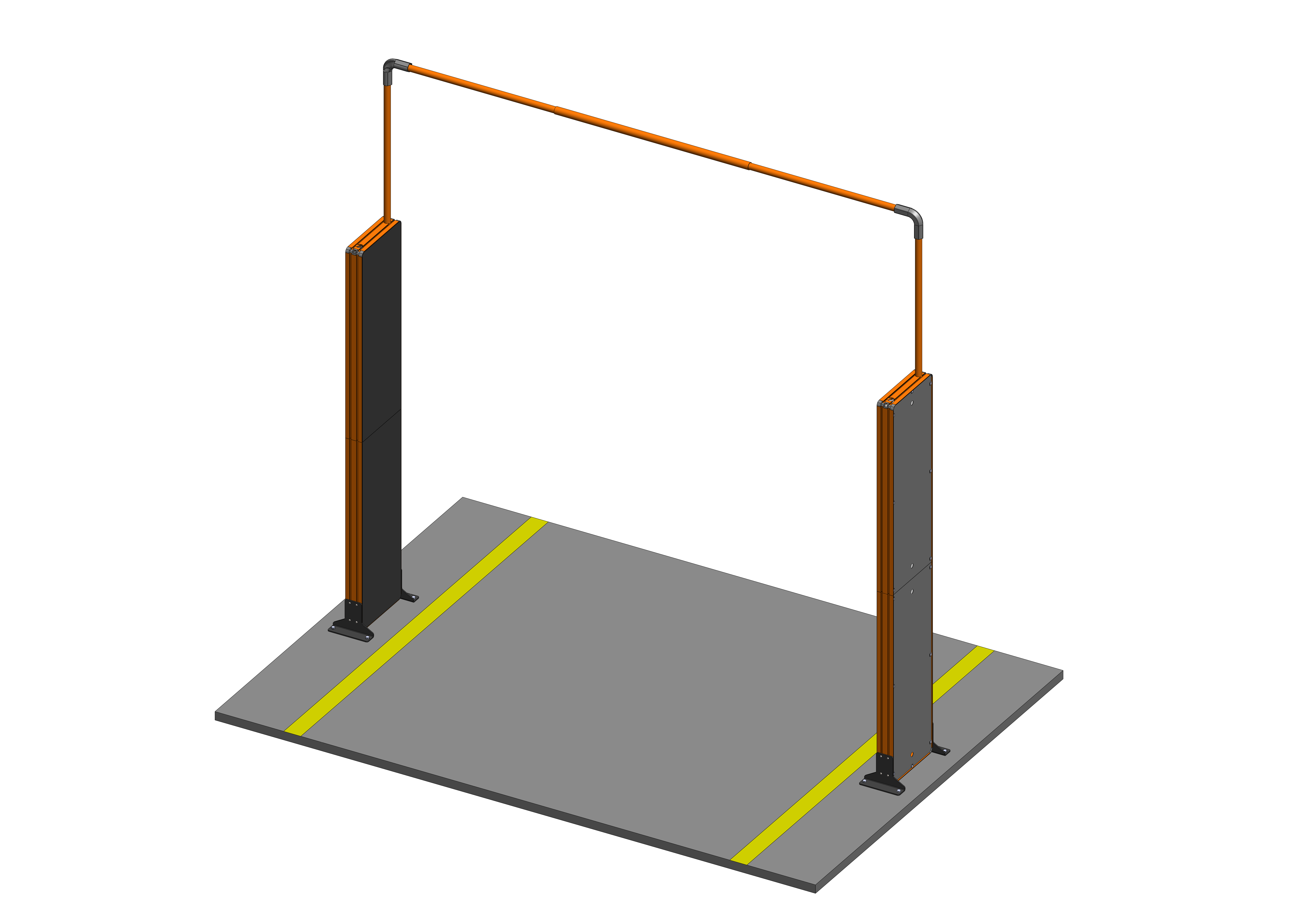
For Portal System installations the Times-7 Cable Bridge is the recommended cable-routing option. Designed for dock door widths between 2.4 m and 3.2 m, it provides a dedicated overhead route that keeps the cabling contained within the Portal installation and accessible for installation, inspection and servicing.
See Cable Bridge assembly guide.
Where existing site infrastructure is preferred, cables can also be routed along the walls or structure surrounding the dock door.
When planning an alternative cable route, consider:
The preferred routing method should therefore be determined during site planning, taking into account the dock door layout, cable lengths and existing infrastructure.
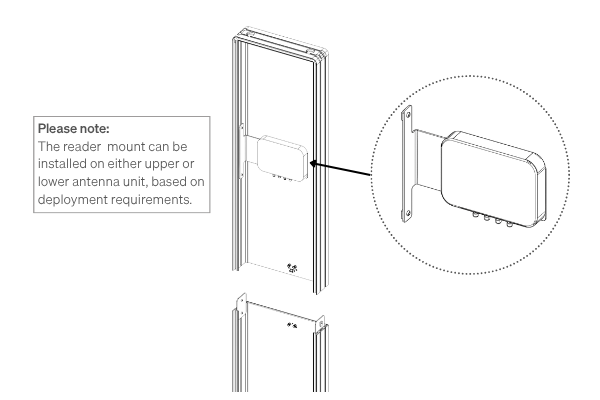
Each Times-7 Portal configuration includes a universal reader mount, allowing the RFID reader to be integrated directly into the Portal structure.
The Portal's internal T-slot interface provides flexibility in reader placement, allowing the mount to be positioned at the height or location that best suits the installation. This provides flexibility for different reader models, cable routing requirements and site configurations, while keeping the reader accessible for installation, configuration and servicing.
This approach also supports the Portal's reader-agnostic design, allowing customers to use their preferred RAIN RFID reader rather than being restricted to a specific reader platform.
Yes. The Times-7 Portal has been designed for palletised transport and on-site assembly, reducing the shipping footprint compared with transporting a fully assembled Portal.
The frame is constructed from lightweight pultruded fibreglass, providing the structural strength required for the permanent warehouse installation, while also keeping the individual Portal components manageable for transport, handling and assembly.
The dimensions and weights are as follows:
| Portal Tower | Portal Unit | |
| Dimensions (L x w x D) |
2207 x 397 x 97mm 23.93 x 12.12 x 0.38" |
1104 x 397 x 97mm 23.62 x 11.81 x 0.31" |
|
Boxed Unit Dimension (L x W x D) |
1150 x 420 x 114mm |
1150 x 420 x 114mm |
| Weight |
Net: 16kg / 35.27lbs |
Net: 8kg / 17.64lbs. |
The Portal is designed for secure floor mounting using the supplied foot plates and installation hardware.
For permanent dock door installations, we recommend anchoring the Portal to the floor to ensure maximum stability and performance. Depending on the installation environment, protective bollards are also recommended to help prevent accidental impact from forklifts or other warehouse equipment.
For details see the Times-7 Portal installation and assembly guide

Every deployment is different, our team is here to help.
Contact us